Feature image for the need to know about wordpress child themes

In this article, I hope that I clarify the idea about WordPress child themes, the uses of a child theme, and how to create a child theme. 

this out a doubt, the most common questions clients asked me about WordPress child themes are: 

  • What is a WordPress child theme?
  • When do you need to create a WordPress child theme?
  • Why do you need a child theme?
  • What are some of the advantages and disadvantages of a child theme?
  • How to create a child theme?

What exactly is a child theme

A WordPress child theme is a WordPress theme that inherits the functionality and style from a parent theme. WordPress created the ability to create a child theme. Because any customization or functions added to a theme would be erased or could break the website whenever the user would have to update. An update is essential for security and the prevention of others hacking into your site. 

With a child theme, you can keep the customization done to your theme and continue to update your parent theme without losing your work or being available to hackers. 

This is the most significant benefit of having a child theme.

To learn more on how to customize your WordPress website. This article will help you achieve the design you want.

THIS IS HOW TO USE ADDITIONAL CSS BOX IN WORDPRESS

Why and When should you use a WordPress child theme?

Using theme frameworks helps designers and developers decrease the production time for creating a website that meets the clients’ needs. There are few occasions when creating a theme from scratch is beneficial, but it is unnecessary in most cases. 

Suppose users are going to customize and make tweaks to there CSS or functions of their WordPress site. In that case, requiring a theme to have a child theme is necessary not to lose your work when you update your parent theme. But if you are going to stay within the limits of the theme’s features, a child theme may no be necessary but would still be a good idea to do anyway. 

On top of everything else, another reason why using a child theme is great to have is because it acts as an extension to the parent theme. The user or developer can create a header.php, footer.php, templates, JavaScript, and CSS file and not worry about affecting the parent WordPress theme. Theoretically, the user can have more files than the parent theme and not worry about losing your work when updating. But if this is the case, I would recommend finding a parent theme with the functionality you need. 

What are the advantages and disadvantages of using a WordPress child theme? 

The advantages of using a child theme are

  • You can safely update your theme regularly.
  • Creating a child theme allows you to have the capability of creating a website that meets your exact needs.
  • It is excellent to have as a fallback just in case a custom functionality breaks. You can away go back to the original function. 

The disadvantages of using a child theme are:

  • There is often a kind of learning curve associated with the parent theme because each theme has its hooks and filters that make up the theme itself. 
  • Another disadvantage comes from the parent them. When dealing with clients’ WordPress websites where the framework’s developers abandon, I have run into many situations, lose interest in maintaining or get acquired by a different development company. 

How do you create a WordPress child theme? 

Fortunately, I have noticed a trend where themes are starting to come with their WordPress child themes attached. This is awesome because it saves you time.

But if a WordPress child theme is not available, then there are two popular methods to creating a WordPress child theme. 

  • Manually create a WordPress Child Theme through FTP or CPanel File Manager
  • Use a WordPress child theme plugin

Manually create a WordPress child theme.
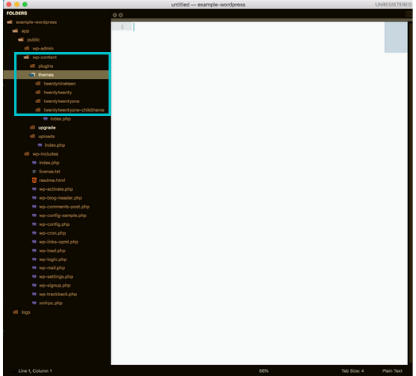
locating the theme folder
  1. Either in your File Manager in your CPanel or through FTP, head to the Public_html > wp-content > themes folder. 

2. Create a new folder within that theme directory. I usually name the child theme after the parent them but attach the child theme afterward like in this example. I turn twentytwentyone into twentytwentyone-child. Do not use spaces for naming. 
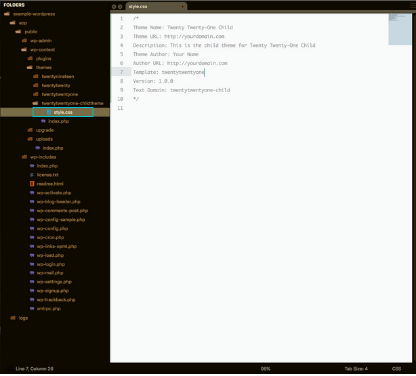
3. Using a text editor like Sublime if you are using FTP or in your file manager’s text editor, create a file named style.css and add the following code. 

/* 
Theme Name: Twenty Twenty-One Child 
Theme URL: http://yourdomain.com
Description: This is the child theme of Twenty Twenty-One
Theme Author: Your Name
Author URL: http://yourdomain.com
Template: twentytwentyone 
Version: 1.0.0 
Text Domain: twentytwentyone-child 
*/

4. Make the necessary changes to the code to fit the child theme you are creating for yourself.
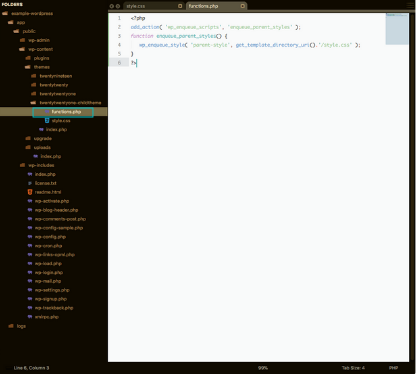
5. In the same directory, create a new file named functions.php and the following code inside the file.

<?php
add_action( 'wp_enqueue_scripts', 'enqueue_parent_styles' );
function enqueue_parent_styles() {
   wp_enqueue_style( 'parent-style', get_template_directory_uri().'/style.css' );
}
?>
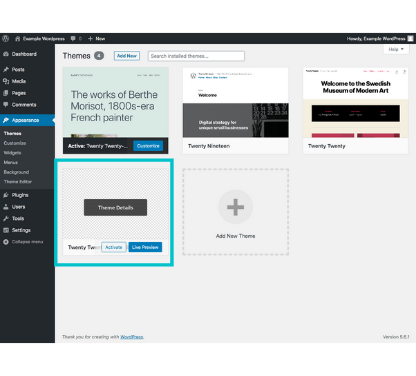
6. After this, log in to your WordPress website and make your way to the themes page. If done correctly, you should see the WordPress child theme.

How to create a WordPress child theme using a plugin. 
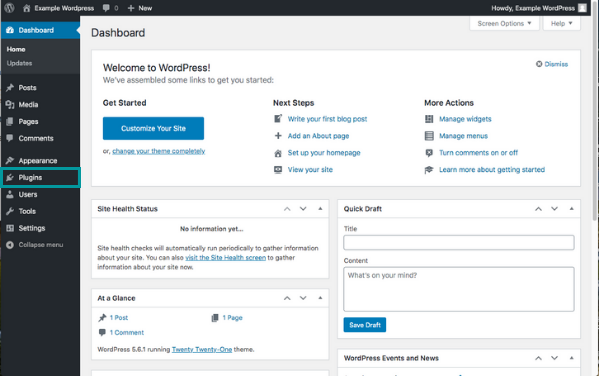
Image of the WordPress dashboard
  1. Head to the Plugins page in your WordPress dashboard.
Image of the WordPress dashboard

2. From your plugin page, navigate to “add plugin.” For this example, in the search bar, type child theme. I will be using “Child Theme Generator” to create our WordPress child theme. Install and activate the plugin. 
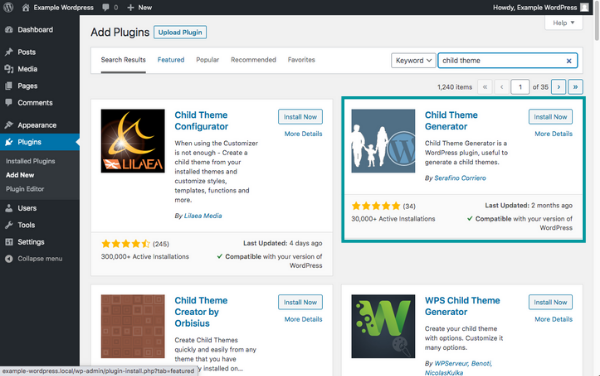
WordPress plugin page showing Child Theme Generator

3. From the plugins page, locate the “Child Theme Generator” and click on the “Create” option. 
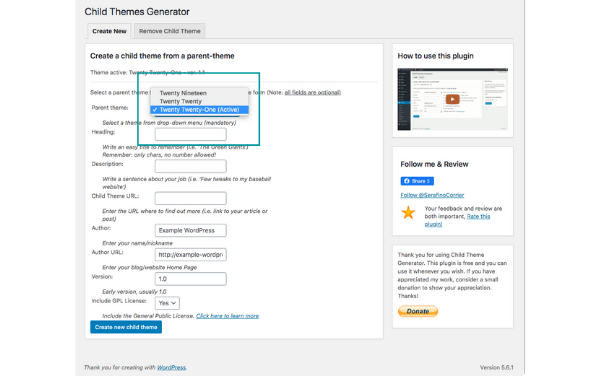
selecting the WordPress theme from the drop down menu

4. In the drop-down, locate the theme that you want to use to create the WordPress child theme. In this example, we are going to continue to use the Twenty Twenty-One theme.
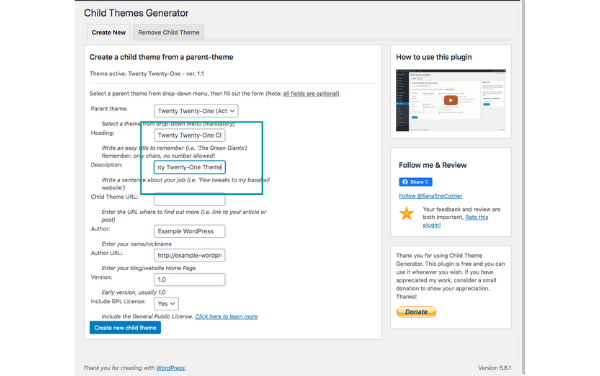
filling in information to create the WordPress child theme

5. In the “Heading,” type the name you want to give your WordPress child theme. Here I typed “Twenty Twenty-One Child,” and for the “Description,” I placed a description about the child theme being created, “This is the child theme for Twenty Twenty-One Theme.” After you are done filling in the two fields, create the new child theme.
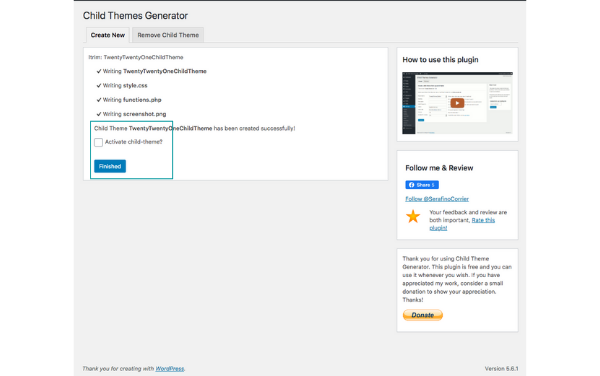
finalize the Child Theme installation and activation

6. Check the “Activate child-theme” box and then click the finished button.
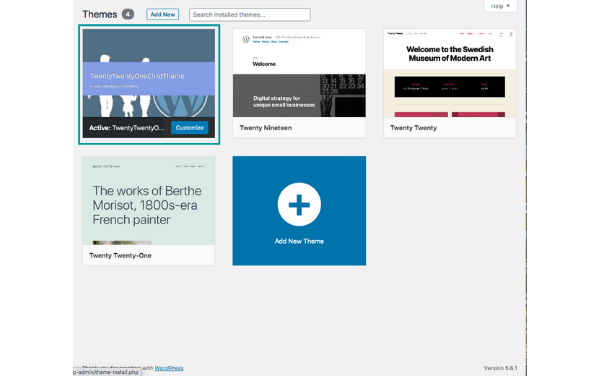
preview of the WordPress Child theme

7. Go to the Themes page in your dashboard, and you should see the new child theme created and activated. 

Conclusion

I hope you now have a good grasp of the importance of a WordPress child when to use, the pros and cons, and how to create a child theme for your WordPress website. My goal for this article is to provide easy to consume knowledge about WordPress and Web Development. 
Please share if you found this article helpful!

contact me

Featured image for the blog 4 Ways to Help with your branding on your website

In an online world, presenting yourself to your customers or audience is important. It is equally important for your website to match your same branding. There is no more of a turn off to customers to have interest in someone or something like wanting one thing but than to find out it’s not the same as the product or service offered. That is why, besides the 4 ways im going to mention, consistency is important through out your whole marketing strategy. So here are the 4 important ways on how to help your website match your branding.


Clear goal

There are many goals as a business that you want to accomplish.

  • get traffic
  • make sales
  • nurture leads
  • market your business
  • the list goes on

Not to say that these are important, but trying to accomplish all of these at once is not practical. Instead of pulling yourself into many different directions, Focus on one goal and let the rest fall into place. 

What is the one thing you want your visitor to do?

  • sign up for a newsletter
  • sign up for a class
  • contact you for information about a service
  • buy a product or service from you

If you want them to sign up for a newsletter, then offer an enticing E-book, industry report, or make an offer that you will provide unique content. 

Website Visuals

As soon as a visitor comes to your website, you have 3 seconds to draw them into something fascinating. The fascination is your personality and cohesive visual flow. 

  • Personality

Today, visitors and customers do not want to buy from you, they want to have a relationship with you, and they want to know who you are and what you believe. Websites have come a long way from the simple info site format. Websites need to feel like you are having a conversation with the viewer, so make sure that your website sounds human and compassionate and not cold and logical. 

  • Logo

Your logo must feel relevant to your branding or business. There is no such thing as a perfect logo or an ideal design of a logo, but put some effort into it but not so much where it becomes frustrating. 

These colors will help you design a fluent design and help you add some character to your pages throughout the website. 

  • Images and Illustrations

Nothing is more distracting than mismatched images and illustrations. A website is about consistency in everything from colors, text, fonts, and Images. Your photos should be high quality images but also use the same filter if you are going to be modifying them as well as the same style and same environment.  

  • Fonts
    • You don’t want to overwhelm a visitor with a barrage of different fonts in your paragraphs and headings. There is nothing attractive about that. Also, it can complicate the process of building a website where it should be simple. It’s not only your website, but fonts can also be handy in all your marketing material. I recommend using no more than two fonts (three under certain circumstances): 
      • Headings (elegant or unique font)
      • subheadings and paragraph text (readable font)

Template Layouts

It is rare for a theme or page builder to offer some page builder template. Utilize this because it not only saves you time but also helps you stay consistent when building support and landing pages. Using templates is a great idea is because if some are skimming through your web pages or blog posts. Help the readers maintain a flow, so it gives your reading a chance to absorb as much information as possible without the need for your reader having to learn a different layout on different pages. 

Cohesive Content Strategy 

  • Messaging
  • SEO
  • Mission
  • Unique Value Proposition

The words you use, the tone in how you say it as well as what you say is important because it helps you build 

  • Authority
    • Authority is the driving force to becoming influential in the space you want to occupy. When someone has a problem that needs to be solved, having authority gives you the advantage of providing a solution over others. 
  • Trust
    • Staying consistent with your messaging also helps build trust. This is because when you remain consistent in speak and action over and over again, your audience will see that you have integrity in your beliefs and values. This kind of trust brings the necessary comfort to your audience to buy from you. 
  • Affinity
    • Affinity comes when trust is built. Affinity is when your audience likes what you say and stand for. This is also important to make because this provides the opportunity to nurture your audience. 

Through this short article, I briefly touched base upon why branding is essential for your website. I only scratched the surface of this topic. But if I can offer you one more piece of advice, you need to be consistent and keep it simple. Starting is hard enough, and going deeper into this subject will only overwhelm you.

Are you ready to make an impact for your business?

I briefly touched base upon why branding is essential for your website. I only scratched the surface of this topic. But if I can offer you one more piece of advice, you need to be consistent and keep it simple. Starting is hard enough, and going deeper into this subject will only overwhelm you.

contact me

feature image for the article 4 Characteristics That Make an Effective Landing Page

There is one reason for creating a landing page.

They are converting prospects into buyers.

Creating a landing page, especially if you are a small business owner or start-up, is intimidating to go through but very important for your marketing strategy. There is no such thing as a perfect landing page. A landing page needs to be a page that goes through the process of improvement over time. 

However, some characteristics need to be focused on to create a high converting landing page. Here are the four characteristics that successful marketers have found to be essential in every landing page. 

The Flow of Information Needs to be Organized

Prospects visit your landing page for a specific reason, so don’t expect them to hunt for what they want to know. On the top of your page, give your prospect the best and essential feature along with the reason why they need that feature. Also, Include a call-to-action with that feature. 

Placing the CTA (call-to-action) above the page may feel awkward to do, but you must consider that your prospects will not scroll past half of the landing page before they decide to leave. 

recap: On the top of the landing page, you should have

  • The best feature
  • The reason your prospect needs that feature
  • A call-to-action to get your product or service

Headlines Need to be Priority

The headline is what drives the prospect to your offer. It is as simple as that. How do you write a compelling headline? 

Here are some quick tips on how to do that.

Use Colors Effectively

Before you put preferred colors on heading and bold words, it is crucial to consider that colors trigger different emotions subconsciously. 

  • Yellow: Clarity and warmth (Nikon, UPS, Hertz, Mcdonalds)
  • Orange: Friendly, cheerful, confident (Shutterfly, Amazon, FireFox)
  • Red: Excitement, youthful, bold (Nintendo, Target, Lego, Coca-Cola)
  • Purple: Creative, Imaginative, Wise (SyFy, Big Brothers Big Sisters, Hallmark, Yahoo)
  • Blue: Trust, Dependable, Strength (Dell, WordPress, American Express, Walmart)
  • Green: Peaceful, growth, healthy (Whole Foods, Starbucks, Animal Planet, Girl Scouts)
  • White: Balance, neutral, calm (Apple, Nike, Wikipedia, Honda)

If you want to learn more about how colors can affect your brand, Help Scout has a great article on how colors are used in many ways regarding branding, logo, and website design. 

Provide Credibility and Approval

Social proof is essential to have on landing pages because influence is created when a person finds out that others have experienced something. We live in an age where testimonials have become more valuable than a word-to-mouth referral; that is not to say that word-to-mouth referral is not beneficial, but providing social proof gives you credibility and authority. 

There are five ways to add social proof:

  • Customer testimonials (this is a classic)
  • Case studies. Similar to a testimonial. However, the difference is that case studies detail how your service and/product impacted your customer. 
  • Have the number of shares visible to see. 
  • Embed social media posts into the page. 
  • Show how many downloads your product has or how many customers you have provided a service to. 
  • You can use more than one of these ways listed above to provide social proof to your prospect.  

Hubspot has an in-depth article about social proof

Conclusion

As I mentioned before, a landing page is something that you have to improve over time, let’s say, every business quarter. But adding these four characteristics to your stray of creating a landing page will help boost the conversion rates and see the growth you want to see from the investment of taking the time to make your landing page. 

Are you ready to make an impact for your business?

Tomorrow never comes today! Feel free to reach out if you want to make an impact to your businesses digital presence.

contact me

featured image for the article A simple strategy for your business during covid and beyond

I talked with a client during our weekly meeting, and we stumbled into a conversation about how we would determine a business’s success during COVID and beyond. 

Without a doubt, COVID has changed the way we do business, But the tools we use to do business existed before COVID. The most important tool is “owned media.”

There are three different media types every business needs. 

  • Earned Media
  • Paid Media
  • Owned Media

Earned Media

Earned media” are platforms such as Facebook, Instagram, Linked In (my favorite), YouTube, Google, etc. Earned media platforms are anything that you have to put effort into communicating with your audience. 

This media is excellent for building exposure, branding, trust, and authority. This kind of media should never be entirely relied on for creating a presence. Many small businesses have a social media profile and no website. This puts your business at significant risk because if that platform were to decide that your business page violates the platform’s code of conduct and then removes your page. All that hard work of building an audience is no thrown away. 

Paid Media

Paid media” is any advertisement you pay for on any of the platforms listed above. Paid media is a good investment only if you know who your audience is. 

If you are still in your business’s discovery stage, the discovery stage is when you are analyzing who is interested in what you have and narrowing it down to the perfect buyer. Otherwise, you will be throwing money away if you try and target the general public and not a segmented group of people. 

Owned Media

Lastly, “Owned media” is a necessity. Owned Media are any platforms that you own. This means websites, podcasts, emails, newsletters, blogs, online learning content, and even a membership site. 

The reason why Owned media is essential to have today is that you own that media source. That is your domain to use. Whether you are promoting, selling, or expressing your views of the world or industry, your site’s content cannot be taken down. 

Going back to the question, I was asked, “how I would determine a business’s success during COVID and beyond.” My answer is any business that UTILIZES their owned media by leveraging earned and paid media. 

When you, as a business or influencer, post something on earned media or pays for advertisements, It needs to be linked back to you, something you own. 

for example:

You post a video or do a live stream on FB (earned media), that video needs to be linked to your website or e-commerce (owned media) site so your audience can either find more information or purchase that product or service from you. 

simplified version

Earned media > product or service > website or ecommerce > buy

Conclusion

It sounds like common sense, but so many small businesses make the mistake of not using the simple flow of driving people from the marketing phase, using earned and paid media to attract an audience, to the selling phase, urging the audience to buy build interest. 

If you want your business to not only survive but to thrive, then utilizing your owned media and leveraging earned and paid media traffic toward your owned media is the best place to start.

Are you ready to make an impact for your business?

Tomorrow never comes today! Feel free to reach out if you want to make an impact to your businesses digital presence.

contact me

I was talking to a friend about goals for this upcoming year. As he mentioned, the new year flows by like any other year. A plan is created, and then somewhere in the middle, the goal is forgotten because life happens.

I thought about what he said and realized that I felt the same way until I started to see my year as four quarterly sprints and not just one whole long year.

Biologically, early humans never had the luxury to think long term because they were busy living to stay alive today to wake up tomorrow.
Last year, thanks to Jason Stapleton, I started to think long term by thinking short.

I take a long term goal; I’m going to do this by this time. Then, break that goal down into four manageable pieces.
example:

1 year goal = 4 quarters = 90 days each quarter.

to break it down

  1. This year, I’m going to accomplish this.
  2. To achieve this, I need to accomplish this every quarter.
  3. To achieve this every quarter, I am going to do this every day.

Real-life goal example:
My goal is to make $100k by 2022.

My first strategy will be to make $15k within the first 90 days or 1st quarter.

Then, the 2nd quarter will be about taking the amount I made in the first quarter; let’s say I make the $15k, and double it to $30k.

The third quarter will repeat the 2nd quarter by taking the $30k and doubling it to $60k, and then in the 4th quarter, I will double what I made in the 3rd quarter.

Thinking short term is more manageable than thinking long term. This is why most people fail to achieve their yearly goal. Implementing this breakdown will increase your chances of maintaining your early goals and delivering the benefit of creating better habits.

What do your yearly goals look like broken down?